

NinjaTrader custom indicators are powerful tools that let traders go beyond the platform’s built‑in studies.
Whether created with NinjaScript, downloaded from trusted third‑party vendors, or shared through the community ecosystem, these indicators allow traders to personalize their charts, automate analysis, and uncover trading signals tailored to their strategies.
By extending technical analysis with custom tools, traders can optimize workflows, improve decision‑making, and adapt NinjaTrader to fit their unique style of trading.
What Are NinjaTrader Custom Indicators?
Custom indicators are user‑built or third‑party tools designed to extend NinjaTrader’s built‑in technical analysis features. They allow traders to identify unique market patterns, automate analysis, or enhance charting beyond default studies. Once applied, these indicators visualize data directly on your chart, giving traders more control over their strategies.
Why Traders Use Custom Indicators
Relying solely on traditional indicators or reading charts with the naked eye can leave traders at a disadvantage. Standard tools often provide generic signals that may lag behind price action, and manual chart analysis can be inconsistent, especially when emotions influence decision‑making. These approaches may miss subtle market shifts, struggle with complex data, and make it harder to maintain discipline across multiple instruments.

Custom indicators solve these problems by offering tailored insights that align with a trader’s unique style. They can highlight patterns not visible with built‑in tools, automate repetitive analysis, and improve timing for entries and exits.
By personalizing charts, traders reduce clutter and focus on signals that matter most to their strategy. This not only streamlines workflow but also enhances confidence in decision‑making, since the tools are designed to reflect the trader’s own logic and risk tolerance.
Types of Custom Indicators Traders Commonly Use
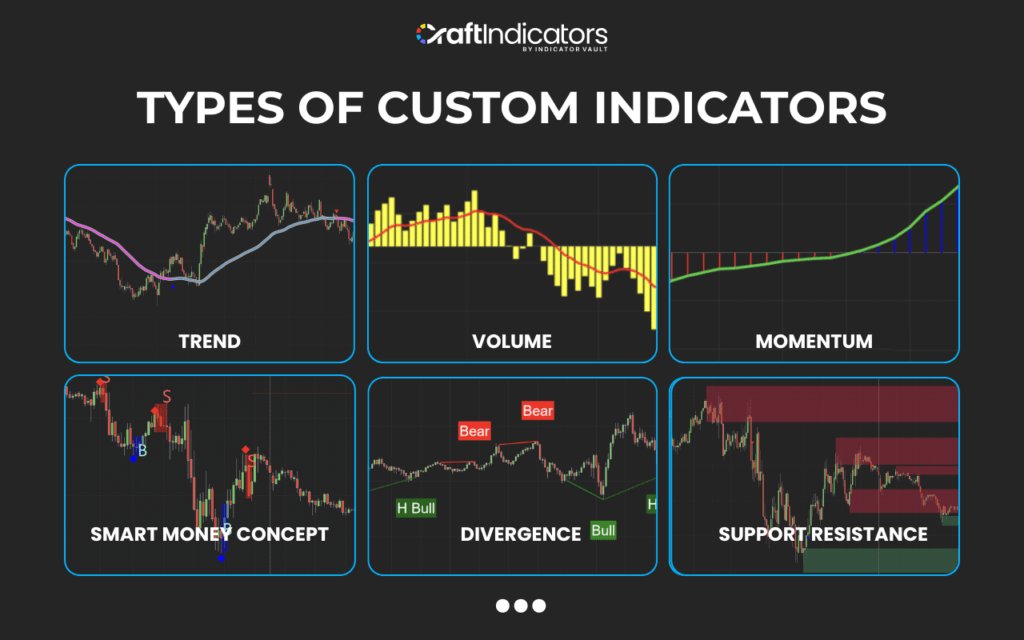
Custom indicators vary widely depending on trading needs. Popular categories include:
- Trend indicators such as SuperTrend or custom moving averages.
- Volume and order flow tools for analyzing market depth and trade activity.
- Momentum and volatility indicators to measure strength and risk.
- Market structure tools like swing analysis, zones, or liquidity markers.
How Custom Indicators Are Built in NinjaTrader (NinjaScript Basics)
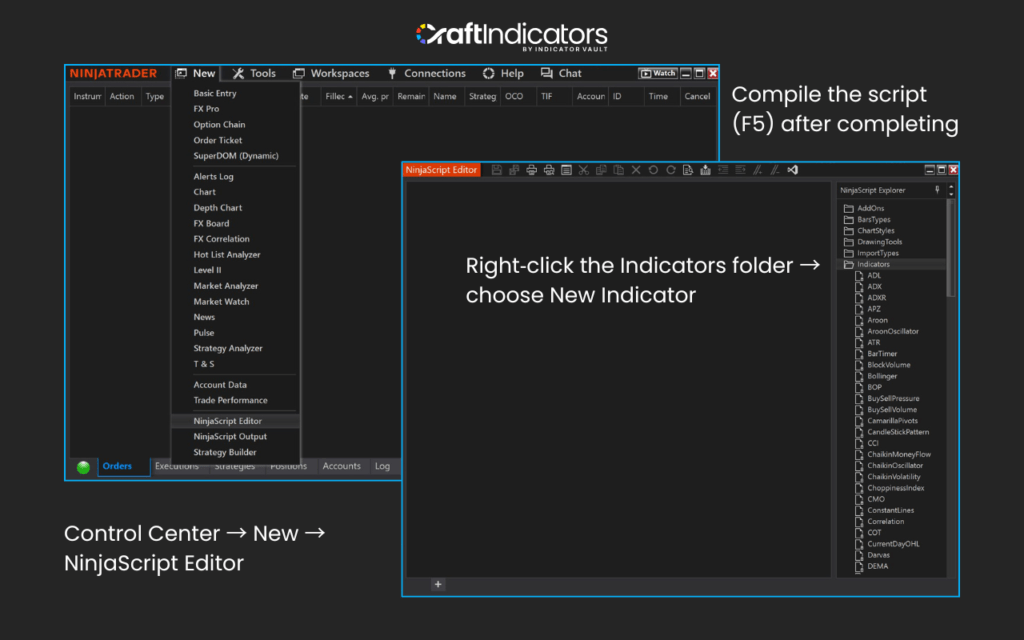
NinjaScript is NinjaTrader’s C#‑based scripting language used to build custom indicators. Core components include OnBarUpdate, OnStateChange, data series, and plots. Traders use these elements to design logic, add alerts, and create custom visuals. With NinjaScript, you can code indicators that fit specific strategies and compile them for use directly in NinjaTrader.
Read More: How to Create Your Own Custom Indicator in NinjaScript Editor
Pros and Cons of Using Custom Indicators
Custom indicators offer flexibility, automation, and deeper insights into market behavior. They allow traders to tailor analysis and streamline workflows. However, they also come with challenges such as complexity, risk of overfitting strategies, and potential performance issues if poorly coded.
While traditional indicators provide a basic foundation for technical analysis, they often deliver generic signals and lack the flexibility traders need in fast‑moving markets.
Custom indicators, on the other hand, unlock deeper insights, automation, and personalization that can transform a trading workflow. To highlight the difference, here’s a side‑by‑side look:
| Aspect | Custom Indicators | Traditional Indicators |
| Flexibility | Highly customizable to fit specific strategies | Limited to preset formulas and parameters |
| Insights | Can reveal unique patterns and advanced signals | Often provide generic or lagging signals |
| Automation | Automates repetitive analysis and alerts | Requires manual monitoring and interpretation |
| Personalization | Tailored to individual trading styles | One‑size‑fits‑all approach |
| Complexity | Requires coding knowledge or third‑party downloads | Easy to apply with minimal setup |
| Performance Risks | May slow platform if poorly coded or overused | Stable and optimized by default |
| Reliability | Quality depends on source and coding standards | Tested and widely accepted across platforms |
| Learning Curve | Steeper, especially for NinjaScript development | Beginner‑friendly and straightforward |
Conclusion
NinjaTrader custom indicators give traders the ability to go beyond built‑in tools and personalize their analysis. They can reveal hidden patterns, automate tasks, and improve trading decisions. While they provide powerful advantages, traders should balance the benefits with the risks of complexity and performance.
By understanding how custom indicators work and how to use them effectively, traders can enhance their strategies and make NinjaTrader a more powerful platform for technical analysis.
Don’t forget follow us to get more interesting news as well as great promotions:
Find this article useful? Share this blog with your friends on social media!
