

If you’ve spent any time researching futures trading, you’ve probably come across NinjaTrader. It’s one of the most recognized trading platforms among active traders, especially those focused on futures markets.
But what exactly is NinjaTrader? Who is it for? And is it actually worth using in 2026?
In this guide, we’ll break down everything you need to know, from its features and pricing to the hidden realities most reviews don’t mention.
1. What Is NinjaTrader?
NinjaTrader is one of the best futures trading platforms and brokerages designed for active traders. Founded in 2003, the platform has become especially popular among day traders, technical analysts, and algorithmic traders.
Unlike beginner-friendly investing apps that focus on stocks and ETFs, NinjaTrader is built for traders who want advanced tools, fast execution, and deep market analysis.
The platform primarily focuses on:
- Futures trading
- Technical analysis
- Automated trading strategies
- Professional-grade charting
- Trade simulation and backtesting
What makes NinjaTrader different is that it’s designed specifically for serious trading, not casual investing.
2. How NinjaTrader Works
At a basic level, NinjaTraderr combines three things into one ecosystem:
- A trading platform
- A brokerage service
- Market analysis tools
Here’s how traders typically use it.
Step 1: Open an Account
Users can create either a live brokerage account or a free simulation account. The simulation account is one of NinjaTrader’s strongest features because it allows traders to practice using real-time market conditions without risking actual money.
Step 2: Download the Platform
NinjaTraderr offers:
- Desktop platform (most powerful)
- Web-based platform
- Mobile trading access
However, the desktop version is still the core experience.
This is important because many modern trading platforms are web-first, while NinjaTrader remains heavily desktop-centric.
For Windows users, this is usually fine. For Mac users, it can be frustrating because they often need workarounds like virtual machines or remote desktop software. You can find the complete NinjaTrader download tutorial here, including step-by-step setup instructions.
Step 3: Connect Market Data
This is where many beginners get surprised. To access live futures markets, traders usually need market data subscriptions. Depending on the exchanges and tools you use, these costs can add up over time. This means the real cost of using NinjaTrader goes beyond simple commissions.
Step 4: Analyze the Market
Once inside the platform, traders can:
- Open advanced charts
- Add indicators
- Analyze price action
- Monitor order flow
- Build watchlists
- Create custom workspaces
This is where NinjaTrader shines. The platform is extremely customizable and offers far more analytical depth than beginner investing apps.
Step 5: Place Trades
Users can trade directly from:
- Charts
- DOM (Depth of Market)
- SuperDOM interface
- Automated strategies
Execution speed is one reason active futures traders continue to use NinjaTrader despite its complexity.
3. Key Features of NinjaTrader
3.1. Advanced Charting Tools
NinjaTrader is known for professional-level charting capabilities. Traders can customize nearly everything, including indicators, timeframes, drawing tools, templates, and multi-monitor layouts
For technical traders, this flexibility is a huge advantage. However, there’s a tradeoff: the interface can feel overwhelming for beginners. Unlike cleaner platforms like TradingView, NinjaTrader prioritizes functionality over simplicity.
3.2. Futures Trading Focus
Most brokers try to support every type of investor. NinjaTrader takes the opposite approach. It specializes heavily in futures trading.
This focus gives traders access to markets such as:
- E-mini S&P 500 futures
- Nasdaq futures
- Crude oil futures
- Gold futures
- Bitcoin futures
For futures traders, this specialization is valuable because the platform is optimized specifically for these markets.
3.3. Automated Trading
One of NinjaTrader’s biggest strengths is its automation capabilities. The platform allows traders to build custom indicators, develop trading algorithms, backtest strategies using historical data, and automate trade execution directly within the platform.
This places NinjaTrader in an interesting middle ground. It’s more advanced than beginner trading platforms but still accessible to retail traders without institutional infrastructure.
In many ways, NinjaTrader is one of the few platforms where retail traders can build serious automated systems without becoming professional software engineers.
3.4. Backtesting and Simulation Trading
This is one of the platform’s most underrated strengths. NinjaTrader’s simulation environment is more than basic paper trading. Traders can:
- Practice strategies realistically
- Replay market sessions
- Test automation systems
- Learn platform mechanics safely
For beginners entering futures trading, this feature can save significant money and mistakes.
Read More: How to Import Indicators Into NinjaTrader Without Hassle
4. NinjaTrader Commission and Fees
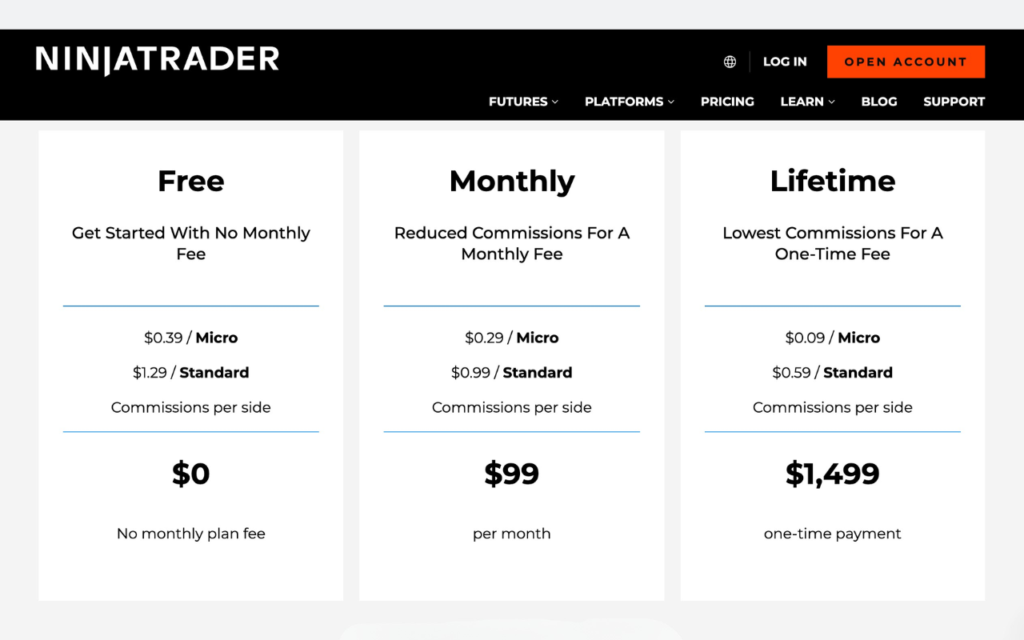
NinjaTrader’s pricing structure can be confusing at first because there are multiple layers.
Hidden Costs Most Reviews Don’t Mention
Beyond platform pricing and commissions, NinjaTrader also includes several additional fees that traders should understand before opening an account. While there are no account maintenance fees or minimum deposit requirements, other trading-related costs may still apply depending on account activity and funding methods.
Some of the most common NinjaTrader fees include:
- Trading Fees: Clearing fees, exchange fees, and market data subscription costs may apply alongside standard commissions.
- Account Fees: No annual account maintenance fees are charged.
- Inactivity Fee: A $25 monthly inactivity fee may apply if no trades are placed during the month.
- Deposit Fees: ACH deposits and incoming wire transfers are generally free, though bounced checks may incur penalties.
- Withdrawal Fees: ACH withdrawals are free, while domestic and international wire transfers may include additional charges.
- Currency Conversion Fees: A 1% conversion fee may apply when funding or withdrawing in a different currency.
These additional expenses can significantly impact overall trading costs, especially for active futures traders using live market data and advanced trading tools.
5. Pros and Cons of NinjaTrader
| Pros | Cons |
|---|---|
| Excellent for Futures Trading The platform is specifically designed for futures markets. | Steep Learning Curve This isn’t just because the interface is complicated. Futures trading itself requires understanding: – Leverage – Margin – Contract specifications – Order flow NinjaTrader assumes users are serious traders. |
| Powerful Charting Professional-level analysis tools are a major strength. | Desktop-Centric Experience The platform still works best on Windows desktops. |
| Strong Automation Features Algorithmic trading support is excellent for retail traders. | Extra Costs Add Up Data feeds and tools can become expensive over time. |
| Fast Execution Popular among day traders and scalpers. | Not Ideal for Long-Term Investors If you simply want to buy stocks or ETFs and hold them, NinjaTrader is probably unnecessary. |
| Advanced Simulation Environment Useful for both beginners and experienced traders. |
6. What Most NinjaTrader Reviews Don’t Tell You
Here’s where real-world trading experience matters.
6.1. Many Traders Use NinjaTrader Only for Execution
A surprisingly common setup is TradingView for charting and NinjaTrader for execution.
Why?
Because many traders prefer TradingView’s cleaner interface while still relying on NinjaTrader’s fast futures execution. This hybrid workflow is extremely common among experienced traders.
6.2. NinjaTrader Is Professional Software for Retail Traders
Many reviews describe NinjaTrader as “advanced.” But a more accurate description is that NinjaTrader feels like professional trading software adapted for retail traders. That’s both its greatest strength and biggest weakness.
6.3. Futures Trading Is Inherently Risky
This is important to understand. NinjaTrader itself is not dangerous, but the products it specializes in can be. Futures trading involves leverage, which means small market moves can lead to large gains, and small mistakes can lead to large losses. For beginners, this risk is often underestimated.
6.4. The Ecosystem Is Huge
NinjaTrader has grown into a large trading ecosystem with thousands of custom indicators, automated strategies, third-party add-ons, and active trading communities. Many traders use these tools to customize their workflows and improve their trading experience. This flexibility is one reason why NinjaTrader remains popular among advanced futures traders and algorithmic trading enthusiasts.
7. Who Should Use NinjaTrader?
- Futures Traders: NinjaTrader is built primarily for futures traders, offering advanced tools for trading index, commodity, treasury, and crypto futures markets.
- Day Traders and Scalpers: Fast execution, SuperDOM trading, and advanced charting make NinjaTrader a strong choice for active day traders and scalpers.
- Algorithmic and Technical Traders: The platform is highly popular among technical and algorithmic traders thanks to its automation, backtesting, and custom strategy development tools.
- Advanced Active Traders: Traders who want deep customization, advanced analysis, and professional-grade execution tools will likely benefit most from NinjaTrader.
8. Is NinjaTrader Safe and Legit?
NinjaTrader is considered a legitimate and well-established futures trading platform. Founded in 2003, the company is regulated by both the Commodity Futures Trading Commission (CFTC) and the National Futures Association (NFA) in the United States. NinjaTraderr also uses security features such as encrypted logins and automatic session timeouts to help protect user accounts.
However, traders should understand that futures accounts are generally not protected by FDIC or SIPC insurance like traditional bank or brokerage accounts. As with any leveraged futures trading platform, users should carefully evaluate the risks involved before trading real capital.
9. NinjaTrader Overall Rating
| Category | Rating | Details |
|---|---|---|
| Account Minimum | ⭐⭐⭐⭐⭐ (5/5) | No minimum deposit required to open an account. |
| Commissions & Fees | ⭐⭐⭐⭐☆ (4/5) | Competitive futures commissions, especially for active traders and micro contracts. |
| Account Fees | ⭐⭐⭐⭐☆ (4/5) | No annual fees, but inactivity and wire transfer fees may apply. |
| Tradable Products | ⭐⭐⭐⭐☆ (4/5) | Supports 100+ futures contracts including indices, commodities, crypto, and forex futures. |
| Trading Platform | ⭐⭐⭐⭐☆ (4/5) | Powerful desktop platform with advanced charting, automation, and order flow tools. |
| Mobile App | ⭐⭐⭐☆☆ (3/5) | Available on iOS and Android, but less polished than the desktop experience. |
| Research & Market Data | ⭐⭐⭐☆☆ (3/5) | Market data subscriptions often required; limited built-in research tools. |
| Automated Trading | ⭐⭐⭐⭐⭐ (5/5) | Excellent support for strategy development, backtesting, and automated trading systems. |
| Ease of Use | ⭐⭐⭐☆☆ (3/5) | Steep learning curve for beginners due to advanced features and interface complexity. |
| Trust & Safety | ⭐⭐⭐⭐☆ (4/5) | Regulated by the CFTC and NFA with standard account security protections. |
Final Verdict: Is NinjaTrader Worth It?
NinjaTrader is one of the most powerful retail trading platforms available for futures traders. However, it’s not beginner-friendly. The platform is best viewed as a serious trading environment built for active market participants – not casual investors.
If you’re committed to learning futures trading, NinjaTrader can be an excellent choice. If you simply want an easy investing app, it’s probably more platform than you need.
FAQs
1. Is NinjaTrader free to use?
Yes. NinjaTrader offers a free version with advanced charting, market analysis, and simulation trading features.
2. Can beginners use NinjaTrader?
Yes, but the platform has a steep learning curve and is better suited for serious traders willing to learn futures trading.
3. Does NinjaTrader support automated trading?
Yes. NinjaTrader supports automated trading, custom indicators, strategy development, and backtesting.
4. Can you use NinjaTrader on Mac?
Natively, NinjaTrader is designed for Windows. Mac users usually need workarounds like Parallels or virtual machines.
5. How much does NinjaTrader cost per month?
NinjaTraderr offers free access, while paid plans typically start at around $99 per month, depending on the license level.
Don’t forget follow us to get more interesting news as well as great promotions:
Find this article useful? Share this blog with your friends on social media!
